


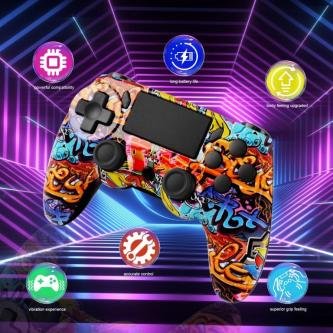

GAMINJA P41 Wireless game controller, compatible with …, Woodlands
-
 Woodlands
 -
Posted: yesterday
-
 Save
Save -
 Share
Share
I. Product Compatibility
Supported Platforms: PS3 / PS4 / PC / Steam
II. Pairing and Connection Guide
1) PS4 Console Connection
With the controller in sleep mode, connect it to the PS4 console using the USB cable to complete pairing; press the PS button to connect wirelessly, then unplug the cable to control wirelessly (LED will automatically reconnect).
Once paired successfully, regardless of whether the console is in sleep mode, simply press the PS button; the LED will flash slowly to automatically reconnect.
Supports simultaneous connection of 4 controllers; the RGB lights are blue, red, green, and pink in sequence for easy identification by multiple users.
2) PC Bluetooth Connection
Long press SHARE + PS to enter pairing mode; the LED will flash rapidly; search for and connect to "Wireless Controller" in your computer's Bluetooth settings.
Once paired successfully, you can play PC games; after pairing, simply press the HOME button; the LED will flash slowly to automatically reconnect to the computer.
3) Wired Connection Instructions
PS3 Wired: Controller in sleep mode → Connect the controller to the console using the USB cable → The corresponding LED will light up steadily upon successful connection. PC Wired: Put the controller to sleep → Connect to the console via USB cable to complete pairing (recommended for Steam games).
III. Product Highlights
✅ Long Battery Life for Uninterrupted Play
A full charge takes only 2.5 hours, providing approximately 10 hours of continuous gameplay; play while charging without interruption, ensuring uninterrupted gameplay for extended periods.
✅ Perfect Compatibility Across All Platforms
Perfectly supports PCs (Windows 7/8/10/11), can be used wirelessly or wired; compatible with the latest system versions, please activate via USB cable for initial pairing.
✅ Ergonomic and Comfortable Grip
Classic streamlined design fits the palm, with finger grooves for comfortable long-term use; low latency, no lag, no disconnections, stable and immersive.
✅ Multifunctional Professional Configuration
6-axis motion sensor + dual motor vibration + touchpad + 3.5mm audio jack + LED light strip + built-in speaker, supporting motion control for more realistic and precise, immersive gaming experience.
✅ Multiplayer Fun: Connect Up to 4 Controllers Simultaneously
Supports up to 4 controllers to connect at the same time, allowing the whole family and friends to play together; the LED light bar displays character status and player ID for easy viewing.
IV. Package Contents
Wireless Game Controller ×1
Charging/Data Cable ×1
V. Important Notes
For best experience, please fully charge the device before first use.
Product printing may vary slightly depending on the version; please refer to the instruction manual for details.
-
 Price$23.98
-
ConditionNew
-
 Flag
Flag -
 Block ad




GAMINJA P41 Wireless game controller, compatible with … has been posted in the Woodlands Gaming & VR category on Locanto.
If you’re still wanting to browse, there is so much to explore in the Gaming & VR category! Take a look at the ads PXN A10 Racing Wheel Stand Foldable Adjustable Racing …, Woodlands, PlayStation2-Winning Eleven 8 : Evolution Legends.// …, Woodlands and Nintendo Switch Yomawari: Lost in the Dark Deluxe Edition in Woodlands to discover more of what you’re looking for. Currently, there are 781 ads posted in the Gaming & VR category in Woodlands.
Interested in more? Widen your search to view ads in nearby areas of Woodlands. This includes Gaming & VR in Central Water Catchment, Simpang and Choa Chu Kang. There are more ads within a 15 km radius for this category. If you want to view those ads, click here.


 Flag this image